

Flashforge Finder 3.0 Review [3D Printer]
This post may contain affiliate links. As an Amazon Associate, I earn from qualifying purchases.
Are you looking for a new 3d printer for your classroom or home and aren’t sure which is the right one for you?
When you first start looking at all the options for the best 3D printers out there it can be very overwhelming! There are a lot of things to consider when choosing a 3D printer including price, size, and performance.
Finding a 3D printer that works for you can be tricky.
And with every printer claiming to be the best, it is hard to cut through the fluff, the product specs, and all the reviews and find out which one is right for you.
Before you know it you can find yourself overwhelmed, scrolling and scrolling, but never finding the answers that you need.
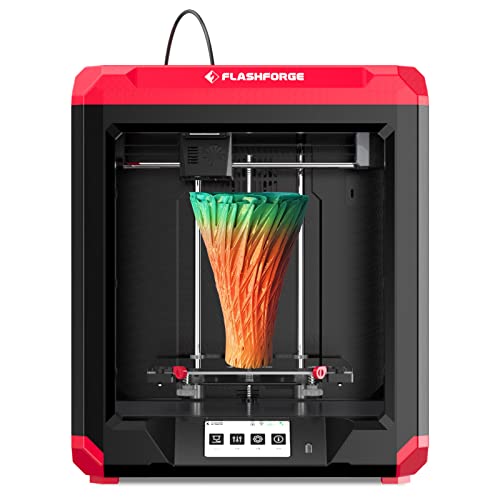
Well, no more! Today we are here with a detailed and in-depth review of the Flashforge Finder 3.0 3D printer.
Keep reading to learn everything you need to know about the printer and to see if it is the one for you!
Flashforge Finder 3.0 Product Overview
Before we get into the review, let’s start with a little overview of the Flashforge Finder 3.0 3D printer.
The new Flashforge Finder 3.0 printer is mid-range model in terms of price and comes with a good range of features. It’s a great option for beginners.
The printer is perfect for getting kids started with 3D printing and would be a great addition to a classroom or library. Of note however it is not in a glass/plastic enclosure like some of the other Flashforge models. 3D printers get very hot so this printer is ideally stored out of reach from little hands.
The printer is designed to be super easy to use, making it the perfect choice for those just getting started with 3D printing. I went from plugging it in to printing my first model in less than 30 minutes!
It is also delivered fully assembled, so all you need to do is set up the plate and cut some zip ties and you are ready to go!
With multiple build plate options, a large touch screen, and plenty of storage, allowing you to save your creations and keep all your models in one place!
Although it’s not the cheapest beginner 3D printer option, the range of features does help it stand out from its competitors, and is a printer we think is worth looking at!
But don’t just take our word for it, let’s dive into our review and get looking at everything this 3D printer has to offer!
Flashforge Finder 3 Features And Design
Let’s start with the features and design of the printer!
We have touched on some of the features earlier in our overview, but there is so much more to this printer! So let’s take a look at some of its best features now.
Build Plate Options
The printer comes with a glass plate already installed and a PEI magnetic spring steel sheet, which is not only flexible but removable too.
I immediately switched to the magnetic steel sheet because this makes it easier to take your model off the plate when its complete. You simply remove it from the magnetic backing and then flex it to peel off your model. I find this much easier than using the scraper and really like this flexible feature.
Having multiple plates allows you and your students the ability to experiment with prints on different surfaces, and for more experienced users to have their favorite build plates ready to go!
The glass plate will create a smoother bottom surface of your model.
3D printers rarely come with two different print sheets, so this is a treat you will want to take advantage of!
The plates can be switched too with the use of two catches, which is fairly straightforward to do.
The printer will also now heat up to 110 degrees Celsius, more than the previous models, ensuring that your models will be heated and set perfectly.
Larger Build Volume
The 3.0 is bigger than the original Finder, offering you more space to make larger items! The build volume for the Flashforge Finder 3.0 is 190x195x200mm.
Not only is it bigger in terms of width and depth, but in height too!
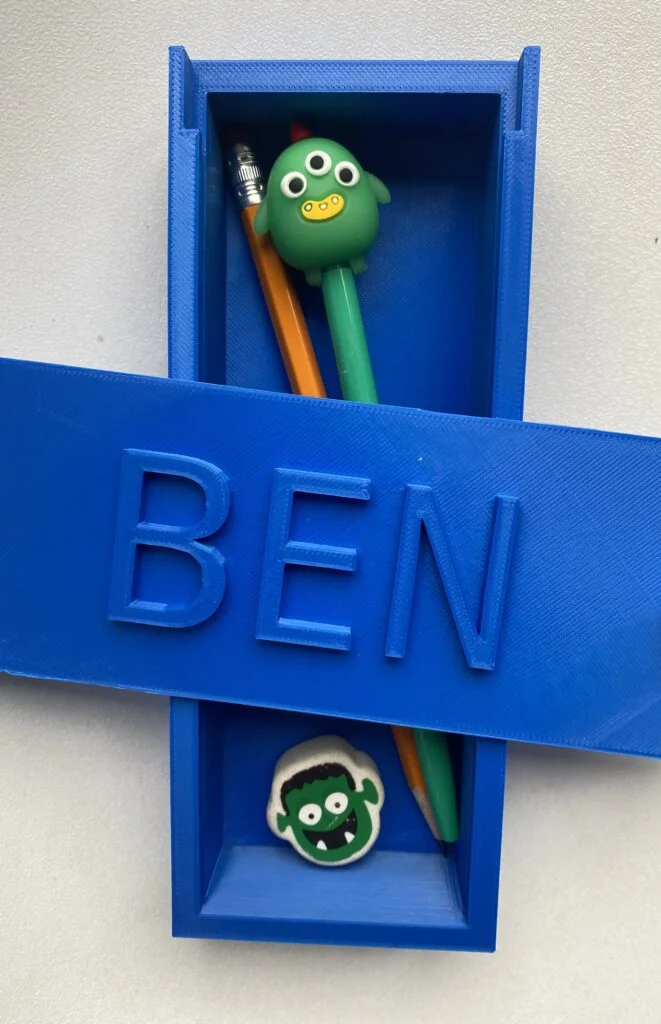
One of the 3D print projects that we made on the printer was a pencil case for my son to take to school. We used this template from Tinkercad to create it! My setting this to the maximum dimensions of the build plate we were able to get a build that was just over 7 inches. As you can see the pencils and pens were a tight fit but they did fit! I really liked this practical project for my son.
The Flashforge 3D printer is meant to be stored on a table or counter. As I noted above it is not fully enclosed so it’s important to store it away from young children that wouldn’t understand not to touch the hot surface.
Although it has a nice build plate sice this printer won’t take up tons of room in your place. It easily fit on an Ikea Kallax shelf for us. Don’t worry, you won’t need to add an extension to your classroom for this printer!
4.3 Inch Touchscreen
Having a touchscreen is a fantastic addition to a 3D printer, and the Flashforge Finger comes with a 4.3-inch one.
It’s larger than the touchscreens on previous models, and is super easy to use!
It also has multiple language options. English, Chinese, Japanese, German, Spanish, and French are installed and ready to use.
Direct Drive Extruder
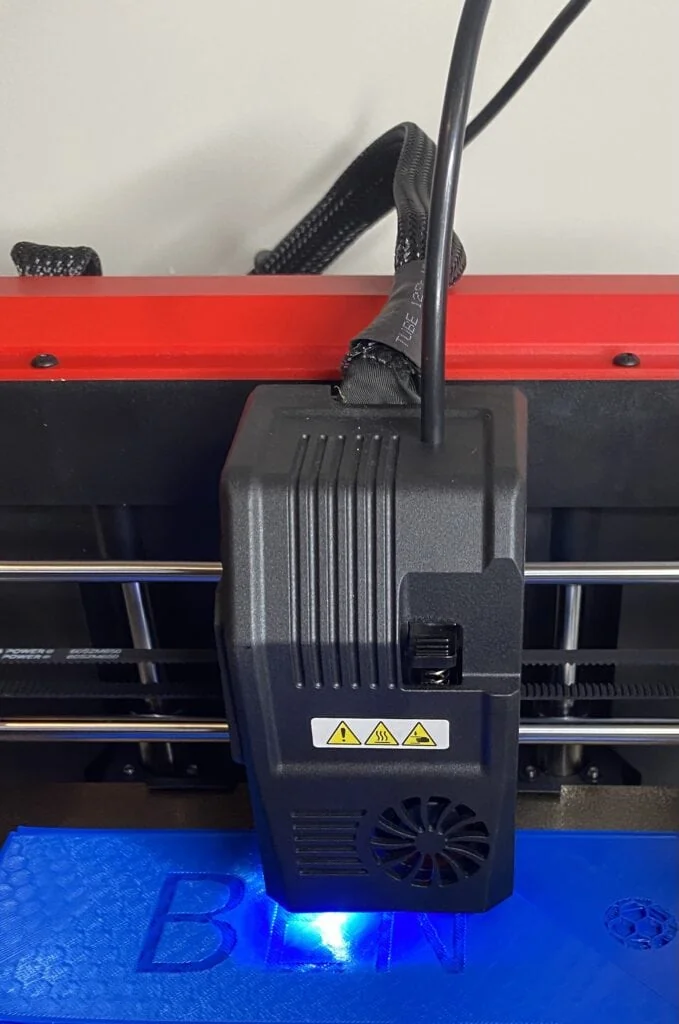
The printer also features a direct drive extruder which is super handy when you are printing with flexible filaments like TPU.
The extruder gets pretty hot too, reaching 260 degrees celsius, offering plenty of heat for most filaments. Flashforge Finder 3.0 is compatible with PU 95A, PLA, ABS, HIPS, PETG , and PETG PRO filaments.
It does mean you won’t be able to use Carbon Fiber and Nylon, but for beginners and schools, this should not be a problem!
Instead, you can opt for high-resistant filament like ABS.
Wi-Fi And Internal Storage
The printer also comes with a Wi-Fi connection for remote printing.
There is also plenty of internal storage that allows you to store your models in the same place without worrying about SD cards or USB memory sticks!
You get 8GB of storage which should be plenty for your designs.
The printer also comes with FlashPrint as standard, which is Flashforge’s slicing software.
It’s quite easy to use, but if you prefer, you can use Simplify 3D or Cura.
Additional Features
That’s right, there are even more features! The following features are super handy to have on the printer too and set it apart from others on the market.
- Extruder lamp – helps to light up the printing area
- Assisted leveling – you can do this easily on the touch screen and turn some knobs to adjust the Z-axis
- Filament sensor and print recovery – this allows you to resume printing in the event of a power failure and you will be notified when filament runs out. Now you will never return to a half-finished product again!
Design
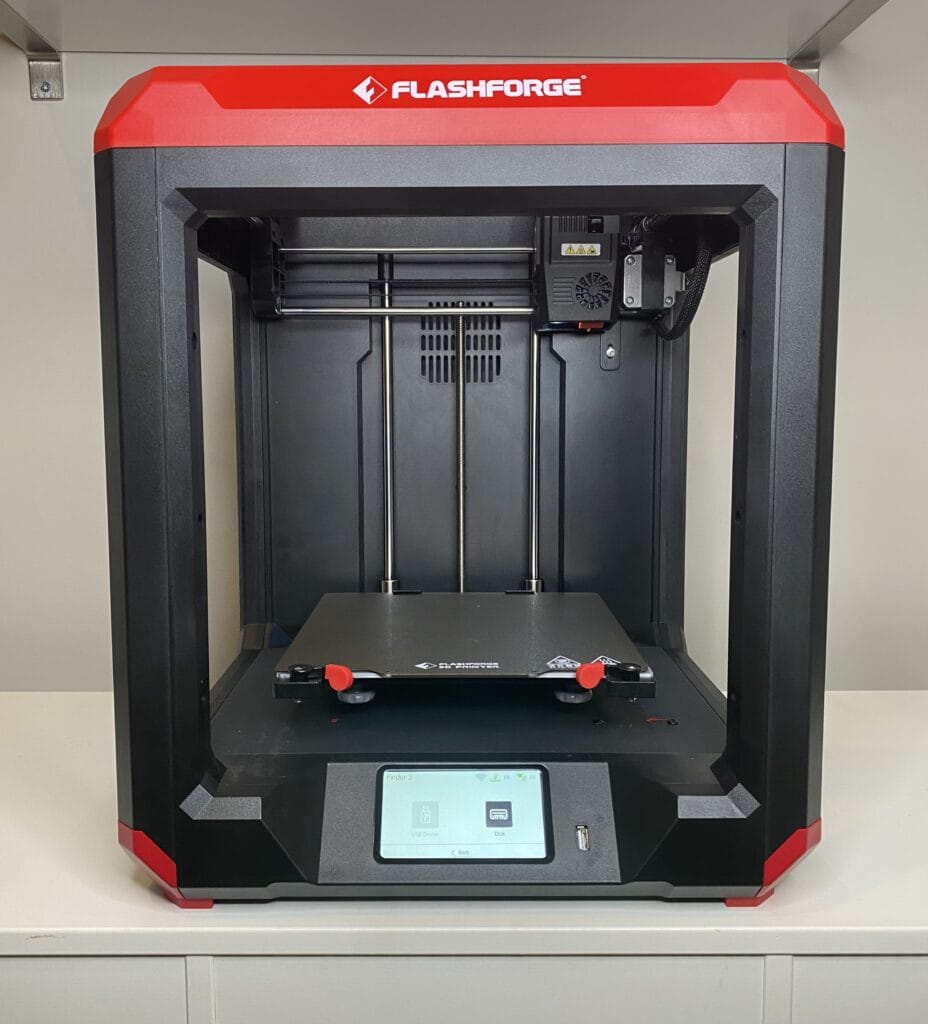
And what about the design of the printer? Well, it is pretty sophisticated!
The printer looks like an open-sided cube with a red banding around the top.
All of the controls are super accessible and easy to use, meaning that students can operate them themselves easily.
We do recommend keeping a close eye on them for their safety, and offering several demonstrations before you let beginners loose on the printer! The print space and the extruder get extremely hot and there is a risk for burns if students are left unattended.
Assembly
We touched on this earlier, but the Flashforge Finder 3.0 arrives almost fully assembled!
We took the printer out of the box, removed some of the packaging and it was ready to go.
I did accidentally cut one of the 3D printer belts instead of a zip tie when I first got the printer. It’s important to note that it’s only the zip ties that need cutting! It was easy to replace and I did it myself with no issue.
In most cases, It won’t take more than a few minutes to set the printer up, although if you are new to 3D printers, you might want to allow more time to do this.
It should fit on a spare desk or table easily, all it needs is to be close to a power supply.
Build Plate Leveling
I decided to switch the the flexible magnetic printing surface. Since I did this I needed to re-level the printing surface.
This involves going into the printer settings and pressing level. The printer comes with an instruction manual that details exactly the 3 steps to complete this. I found it extremely easy to do. As per the manual, they suggest that you use a blank piece of a paper to complete the level and ensure you have the write amount of pressure from the nozzle on your printing surface.
Printing
So how does it print? Well, very well! You can make small objects with a good level of detail in them, making them ideal for beginners.
If you are looking for some instructions of how to get started with your first 3D printing project visit our introction to 3D printing for kids.
We started off making 3D printed name tags for my son’s birthday party. I made personalized name tags for each child to put in a goodie bag. These can later be used as keychains so I was pleased that they would have multiple uses.
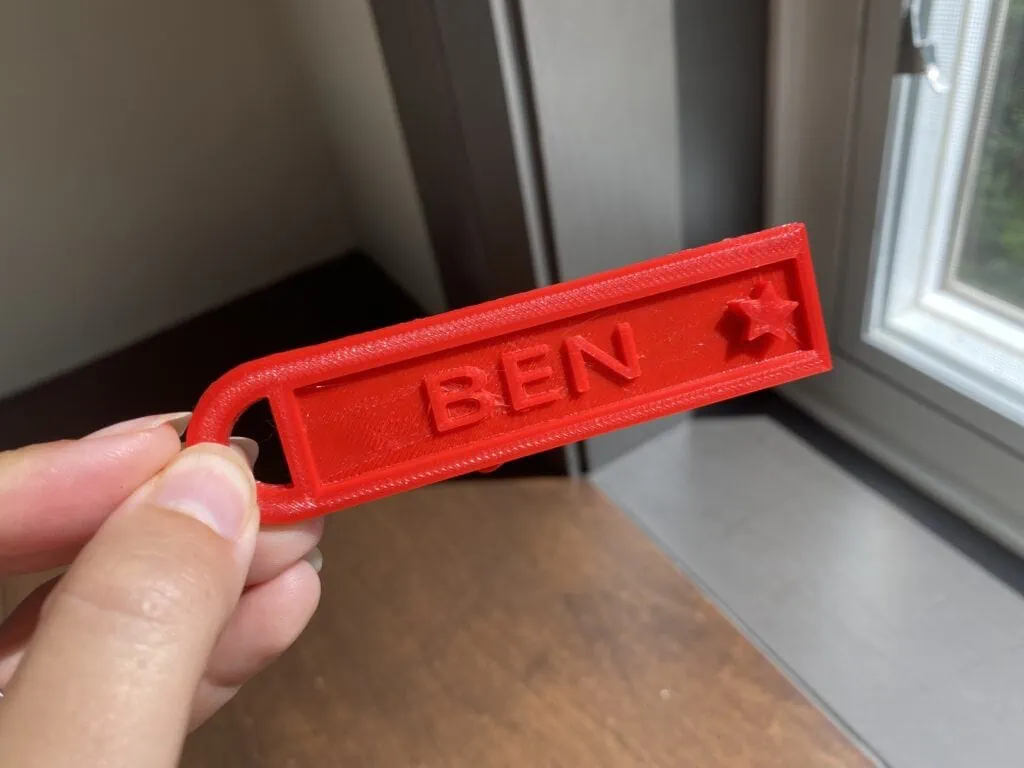
To create these I found a template on Tinkercad, updated it to reflect the names of the kids attending and I had them printing in no time. Once I had the .stl file created from Tinkercad I needed to splice it in the Flashforge 5 software which came with the printer and is compatible with a variety of operating systems (including Mac!).
We were able to make 4 name tags in about 2-3 hours using the ‘fine detail’ setting.
Generally this printer is great for small hobby projects. Think handy keychains, small cups, and pots, we have even seen some cool skulls made with the printer!
All of these can have plenty of detail, the printer is more than able to handle them!
It’s a good printer for beginners getting to grips with 3D printing.
If you were looking to print large objects with lots of intricate detail and complex patterns or pieces, then this probably isn’t the printer for you as you may need a professional model.
But for those after a good entry-level printer, it’s the one for you!
Support
When purchasing anything this expensive, you always want to know that the support you need is there.
As I mentioned when I first got the printer I did accidentally cut the printer belt when I was opening it. I was impressed with the speed and responsiveness of the support team.
You can expect a quick response from an expert that will help you with our issue or send replacement parts if needed. Other reviews mentioned similar good experiences.
They also send you a detailed manual out when you purchase the printer so that you always have a digital copy at hand.
The manual was easy to read and I was able to follow the directions without much need for extra interpretation.
Their tech support is always available for you to use, and it makes the process of using a 3D printer for the first time super smooth.
Final Thoughts – Is The Flashforge Finder 3.0 Worth It?
Is the Flashforge Finder 3.0 3D printer worth it? We think so!
The entry-level 3D printer is perfect for educational purposes and showing children how their designs can come to life.
It is easy to use, and capable of creating more intricate designs as your skills develop.
Although its an expensive purchase, with so many cool things to create you will surely get your value from it easily!
Other Flashforge Printers to Consider
Flashforge makes a whole suite of 3D printers to suit a variety of needs. Check out some of their alternative options listed here.

- Vivid Multi-Color Printing: Bring your creations to life with vibrant, multi-color prints. This printer supports up to 4 colors simultaneously, giving you endless creative possibilities.
- 1-Click Auto Leveling: Enjoy smooth, uninterrupted prints with the advanced 1-Click Auto Leveling feature that automatically calibrates your print bed for optimal results every time.
- Ultra-Fast 12X Printing Speed: The AD5X features a Core XY structure with speeds up to 600mm/s and acceleration of 20,000mm/s². Its stable design boosts both efficiency and print quality, making it ideal for rapid prototyping and batch production.

- One-Click Automatic Printing: Experience hassle-free 3D printing with the Adventurer 5M Series. Enjoy automatic bed leveling for flawless first layers, ensuring consistent adhesion and saving time with no manual adjustments required.
- 12X Ultra Fast Printing: Featuring a CoreXY structure with 600mm/s travel speed and 20000mm/s² acceleration, the AD5M maximizes efficiency, reduces production cycles, and ensures high precision, making it ideal for rapid prototyping and mass production.
- Smart and Efficient Design: Quick 3-second nozzle changes, a high-flow 32mm³/s nozzle, and fast 35-second warm-up to 200°C deliver stable high-speed printing. Its dual-sided PEI platform and versatile options provide easy removal and adaptability for various creative projects.

- Efficiency Driving Creativity: The high-performance of the Adventurer 5M Pro 3D printer offers you greater creative potential. With a maximum travel speed of 600mm/s and with an acceleration of up to 20,000mm/s², your designs can be swiftly realized. No waiting required, the nozzle heats up to 200°C within 35 seconds, saving you valuable time.
- Quality Assurance for Intricate Details: Fast printing doesn't compromise on quality. The Core XY structure and all-metal frame ensure stability during high-speed movements. Offering multiple nozzle sizes (0.25mm, 0.4mm, 0.6mm, 0.8mm), you could strike a balance between speed and intricate details, achieving impeccable print quality.
- Smart Convenience and Innovative Experience: Adventurer 5M Pro employs pressure sensing for automatic bed leveling. It detects platform height with multi-point precision, ensuring flawless initial layers. No manual adjustments, no Z-axis calibration, and no print raft needed. Plus, the dual-sided PEI platform enables easy tool-less model removal.

- Unparalleled Speed: With Core XY All Metal Structure, Flashforge Adventurer 5M Can realize Max 600mm/s travel speed and 20000mm/s² acceleration, More than 70% shorter time when printing at least. AD5M greatly improves efficiency, makes efficient use of space and ideal for kids and home use
- Details Better: 32mm³/s high flow nozzle,rapid heating to 200°C in 35s, to ensure that the filament are fully melted during high-speed and high-temperature printing, built-in vibration compensation to reduce spillage and print resonance. Adventurer 5M can create smoother and clearer model details
- One-Click Automatic Leveling: Effortless to get flawless first layers without any operation or attention. 5M 3D Printer with dual-sided PEI platform can remove model easily and support multiple platform options to meet the needs of different users and usage scenarios
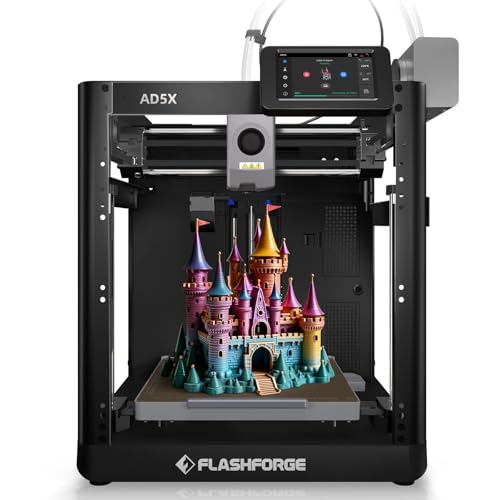
- Enjoy 4-Colors Printing: With Intelligent Filament System,FLAFORGE AD5X allows your printing in 4 colors,and will be about to achieve different types of filament combinations. Features auto filament loading/unloading and up to 4kg filament auto refill function, AD5X will reduce the burden of manual material replacement, ideal for commercial industrial use
- Speedy and Stable: FLASHFORGE AD5X multicolor 3D printer can reach up to 600mm/s travel speed and 20m/s² acceleration, CoreXY all metal design ensures stable printing quality at high speed
- Multi-Filament Print:Equipped with 300°C High Temp nozzle andd 32mm³/s large flow hotend will greatly shorten the waiting time for printing.Easily achieve multi-colorprinting for flexible TPU,carbon fiber filament,PLA and PETG,etc
Kate is mom of two rambunctious boys and a self-proclaimed super nerd. With a background in neuroscience, she is passionate about sharing her love of all things STEM with her kids. She loves to find creative ways to teach kids computer science and geek out about coding and math. She has authored several books on coding for kids which can be found at Hachette UK.


