
Creative Ways to Use Chromebooks in the Classroom
This post may contain affiliate links. As an Amazon Associate, I earn from qualifying purchases.
Over the last few years many classrooms have been outfitted with Chromebooks for their students to use. Where I live, most k-12 classrooms have 1:1 devices and many send them home each day too. These small but mighty laptops can be a great tool for all types of students and classrooms, if you leverage them. All too often however, they become a glorified typing machine or simply a game-wielding distraction from the day’s tasks.
Being a Google product, Chromebooks work seamlessly with Google Classroom and the rest of the Google Suite. Their price point is great too. But what else can you do besides use Google Classroom?
Below are some ways that these tools can contribute to collaboration, creative thinking, and STEAM skills in your classroom.
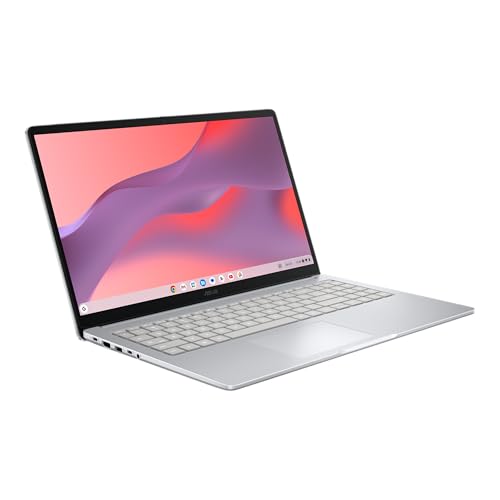
- GOOGLE AI PRO, 2TB OF STORAGE, AND MORE FOR 3 MONTHS AT NO COST — Boost your productivity and creativity with 3 months of Google AI Pro -- now including NotebookLM -- on us when you purchase a Chromebook.*
- UP TO 10 HOURS OF BATTERY -- With up to 10 hours of battery life, Chromebooks pack enough stamina for a long flight, a full workday, or a streaming session.**
- STARTS FAST. WON’T SLOW YOU DOWN -- Fast Boot starts you up in under 10 seconds for more doing, less waiting. Automatic updates keep your Chromebook feeling fast and up to date by downloading the latest software and security features behind the scenes – without interrupting you.

- FOR HOME, WORK, & SCHOOL – With an Intel processor, 14-inch display, custom-tuned stereo speakers, and long battery life, this Chromebook laptop lets you knock out any assignment or binge-watch your favorite shows..Voltage:5.0 volts
- HD DISPLAY, PORTABLE DESIGN – See every bit of detail on this micro-edge, anti-glare, 14-inch HD (1366 x 768) display (1); easily take this thin and lightweight laptop PC from room to room, on trips, or in a backpack.
- ALL-DAY PERFORMANCE – Reliably tackle all your assignments at once with the quad-core, Intel Celeron N4120—the perfect processor for performance, power consumption, and value (2).
How to Use Chromebooks in the Classroom
Stop Motion Video
Stop motion is often made with small figurines or clay, but you and your students can use Google Slides to make simple stop motion films. Adding this to your student repertoire of skills and presentation styles will encourage creativity and planning from students of all ages.
To start, have your students choose a picture of a person or animal. They can create a setting for the character and set up their first slide. Then they copy that slide at least 20 times. Slide by slide they can move the character slowly in one direction. When the slides are played in order it will look like the character is walking around the setting.
Use this as a way to encourage writing, storytelling, plot structure, or animation. Students could even put their own face on the character and tell a narrative story.
Digital Jigsaw Method
There are multiple ways that you can use the Google Suite of tools as a tool for collaboration and information sharing between students. In order to truly get individual contributions and not a lot of copying, however, I like to control who has the ability to see each other’s work until I am ready.
Traditionally, the jigsaw method has classroom groups that each focus on a different specialty task. After studying their expertise and making a product with a team that consists of students with their expertise, the groups then split up and reform to create groups with one person from each of the various specialities. The newly formed teams then share and each member uses their specialty to complete a task as a group.
You can do this digitally, allowing this method to be used in virtual classrooms, over multiple days, and with 爸爸妈妈啪啪啪视频 tools of your choosing. Start by creating a folder for your class and then have a folder for each group. Within each folder you will have a document or slide deck for each student in that group. Depending on the age of your students, you may need to set this up for them, or you can have students place their documents into a folder you share with them once you are ready for them to collaborate.
Let’s say we are using the jigsaw method to learn about different time periods of American History. Each group will be assigned a different period of American History, and they are tasked to create a “one pager” showing the most important technologies, people, and events on this time period. Each student will complete their work on a Google Document or Slide. Then, students place their work into a group folder for their time period. Now there are 4 or 5 one pagers for each time period. Rearranged into new groups, with one student from each time period, students become the specialist and they work together with their team to create an American history timeline.
What I like about this activity is the collaborative and individual accountability it provides for the students. Each student has a role and must contribute to their team. Additionally, all students end up with a large depository of resources that they can use for reference during the final activity or in the future.
Live Brainstorming and Feedback
Having these digital devices in the hands of our students, gives us the opportunity to tap into each student’s brain, when we definitely do not have time or energy to listen to each student’s verbal response.
Google Slides has an audience Q&A tool that could be leveraged in many secondary classrooms to elicit students’ questions without the social stigma or fear of interruption. When you activate this tool as a presenter, a short url is posted to the screen, and your audience can use this to ask questions as you present. Simply press the small arrow next to your present button in Google Slides, then select the Presenter View option to open up the presenter tools and the audience tools will allow Audience Q&A to be activated.


If you are lucky enough to have a school that subscribes to Nearpod or AhaSlides, you are a lucky one, don’t sleep on these tools. Where many class sizes are getting larger, these tools that allow educators insight into each of their student’s thinking is key! If your school is not funding these tools, there are other tools that may have enough free capability, and can be more affordable for educators to purchase on their own, such as PollEverywhere, Slido, or GoSoapBox. All of these tools can be used to keep your students engaged, and thinking while learning. Live data for the teacher shows misconceptions or challenging concepts to the teacher as they teach so they can be instantly addressed. All of this is done while also putting accountability on the students to be engaged and present during classtime.
Padlet is another great option that has plenty of usability for FREE. Simply set up a board and your students can put sticky notes up with their thoughts, answers, pictures, or links. St art off your research projects with a brainstorming and researching finding session and create a hive mind on Padlet.
Stick it in the Blender!
Okay, the fun and games are all great. Kids love using 爸爸妈妈啪啪啪视频; but how can you truly leverage this tech resource to change your classroom and increase not only engagement but learning too? You have perhaps heard of “flipped classrooms” where lectures are at home, and what has traditionally been homework is done at school. What I propose is a blended up method to turn your class into a personalized learning mecca. Stop talking to all 30 (40…45) students at one time as if they are all alike. Save your voice and your sanity.
With some prep and planning, you can develop your learning units into self guided modules, where your students have everything they need at their fingertips. Leverage Google Classrooms’ assignment features to assign appropriate tasks to the students who need them. Pre Record any lectures you give, and free up your classroom time to be there for the students. It is so freeing to be able to actually talk to your students and roam the classroom, not worried about if you are going to get through the lesson in time. Your students are busy learning from you, and you are right there to help; it is like you have cloned yourself.
While this can seem overwhelming to tackle, start small and go from there. Prerecorded instructions and daily tasks for students. Start building the routines for them to seek out what they need, rather than demand it from you at any given moment. I have seen classrooms that seem as if they would run seamlessly if the teacher was there are not using methods like this. The students know where to find daily 师生啪啪啪视频; they can rewatch the instruction if they need to, and they are in charge of meeting their own learning goals.
Take baby steps towards the future by educating yourself on new models of teaching. It is time to get rid of the “sage on the stage” and instead create a resource for students to learn from, all the while freeing yourself up to be available for them when they need one-on-one help. By building those learning 师生啪啪啪视频 like you always have and placing the power in your students’ hands everyone is better off. Using the tools that Chromebooks and Google Classroom give you, you can transform your teaching.
Don’t Give Up Making Chromebooks Work for Your Classroom
Being willing to try something new is the first step. And yes, it may fall flat on its face at first, but you can try again, and learn; just like you ask your students to. Not only can these 爸爸妈妈啪啪啪视频 tools help you know your students better, help them learn more effectively, and engage them, but they can also decrease your workload and bring back your sanity.

Kate is mom of two rambunctious boys and a self-proclaimed super nerd. With a background in neuroscience, she is passionate about sharing her love of all things STEM with her kids. She loves to find creative ways to teach kids computer science and geek out about coding and math. She has authored several books on coding for kids which can be found at Hachette UK.


