

Python Choose Your Own Adventure Game Tutorial
This post may contain affiliate links. As an Amazon Associate, I earn from qualifying purchases.
In this article we will walk through how to create a choose your own adventure game in Python from scratch! If you’re new to Python you can check our beginner tutorial!
How the Game Works
Before we start coding, let’s go over the basic idea of the game. The game will be text based, which means the story will be printed to the user in text form. In a choose your own adventure game you allow the player to make choices at every step of the way. Here is an example of one choice a player might encounter:
You're cooking when suddenly a fire starts! What do you do?
1: Run outside and call the fire department
2: Try to put the fire out
For our game, the player will have a series of choices that will lead to some ending, good or bad, and you get to decide the story!
Key Python Concepts
Let’s first review a couple key python concepts that we will use in the game.
Multiline Strings
In python, we can have simple strings like so:
alphabet = "abcdefghijklmnopqrstuvwxyz"
print(alphabet)
abcdefghijklmnopqrstuvwxyz
Notice how when we print this string, it all prints on the same line. However, there is another type of string we can utilize called the multiline string. We will go over two different ways to create a multiline string.
Newline Character
The newline character is a special kind of character, it indicates to python that you want to start a new line within your string. All special characters in python start with a backslash. A newline special character looks like this: “\n”. Here is an example of a string that uses a newline character:
newLineString = "First line \nNext line \nLast line"
print(newLineString)
First line
Next line
Last line
When we print the string out, it prints out multiple lines where we indicated!
Triple Quotes
We can create multiline strings without a newline character by using triple quotes around the string. Here is an example:
multiString = """First line
next line
last line
"""

print(multiString)
First line
next line
last line
Using triple quotes is a little bit cleaner to use, but both methods will come in handy for our game!
Conditionals
Since the game will depend on the choices the player makes, we will need to use conditionals. Conditionals allow you to control the flow of your code. Here is an example of a conditional block:
if x > 0:
    print("positive")
elif x < 0:
    print("negative")
else:
    print("zero")
Notice how the code can do three different things here, depending on what the value of x is. We can also have conditional blocks inside other conditionals like so:
if x > 0:
    if y > 0:
        print("both positive")
    elif y < 0:
        print("x positive, y negative")
    else:
        print("x positive, y zero")
For our game we will need to use conditionals to determine what path we should take based on the player’s choices!
Python Create Your Own Adventure Digital Resource
Do you want all of the material covered in this tutorial in an easy to use in classroom lesson? Grab our Python Create Your Own Adventure Tutorial!
- 熟妇高潮喷沈阳45熟妇高潮喷 Python tutorial for teachers to introduce their students to Python.
- Includes a 12-page PDF worksheet with an answer guide and a 27-slide Google Slides presentation.
- Covers how to program a Create Your Own Adventure Game in Python.
- PDF worksheet contains exercises that gradually develop students’ 熟妇高潮一区二区在线播放 skills.
- Google Slides presentation is engaging and visually appealing, with interactive examples and illustrations.
- Suitable for both experienced and new 熟妇高潮一区二区在线播放 instructors.
- Provides a solid foundation in Python 熟妇高潮一区二区在线播放 for students to build on.
- An excellent resource to teach Python in a fun and effective way.
Want all our Python Tutorials?
- The Python Ultimate Bundle is an all-in-one package that includes all the Python tutorials you need to teach your students 熟妇高潮一区二区在线播放 and game development.
- The bundle includes tutorials on Python Basics, Python Lists, creating a story in Python, Rock Paper Scissors game, Fortune Teller game, Create Your Own Adventure game, Blackjack game, and Dice game.
- Each tutorial is engaging, fun, and easy to follow with clear instructions and real-world examples.
- The bundle includes resources such as PDF 老子影院午夜精品无码, answer guides, and Google Slides presentations to help students learn at their own pace.
- This bundle is perfect for teachers who want to provide their students with a 熟妇高潮喷沈阳45熟妇高潮喷 introduction to Python 熟妇高潮一区二区在线播放 and game development.
Storyline
Before we get into coding, we need to determine what the story of our game will be. There should be multiple paths a user can take, and each path should end in winning or losing the game. This can get confusing, so it may be helpful to draw out a chart of all of the choices.
For this tutorial, we will be going on an adventure through Pythonland to help the king retrieve his gold from the evil Lord Evilton! Here is what the chart for this adventure will look like:
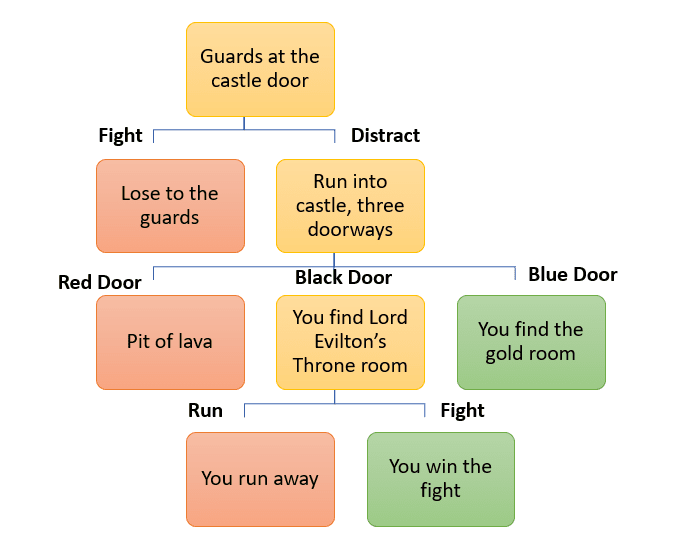
The red boxes indicate a losing path, while the green boxes indicate a winning one. Once you have your story put together, we can start coding!
Coding the Game
First thing we want to do is give the player a little introduction to the game. You can type out your introduction in a multiline string, and then we want to print it to the player:
def playGame():
    introduction = '''Hello and welcome to the Pythonland Adventure!
The kingdom of Pythonland needs your help! The evil Lord Evilton has stolen the King's gold,
and we need your help to get it back!'''
    print(introduction)
We want the player to be able to start the game over at the end if they want to play again, for this we will use a while loop. We can keep track of if the user wants to keep playing in a variable stillPlaying. We will initialize it to True, and then change it to False once the user decides to stop playing. We will use this as our condition in our while loop.
Here is our while loop:
    stillPlaying = True
    while stillPlaying:
Now we can start giving the player choices! For this we will use the input() function that is already built into python. Here is an example of how we can use it:
    stillPlaying = True
    while stillPlaying:
        choice = input("Do you accept the challenge? (y/n) ")
What we do next will depend on what the player picks, this is where we need to start using conditional blocks. Since there are only two options for this one, we can just use an if-else block.
if choice == "y":
            print("You approach Lord Evilton's castle, but there are guards at the door. How do you want to proceed?")
            choice = input("1: Throw a rock in the bushes to distract them \n2: Try to fight through them ")
We are currently coding the story for if the user inputs ‘y’ to continue on their adventure. We haven’t gotten to the else statements yet!
If you made a chart of your storyline, now is a good time to reference it! We can repeat the same process for both the if and else blocks, depending on what is happening in the story.
Now they will need to choose between option one 1: Throw a rock in the bushes to distract them or 2: Try to fight through them.
Here’s what we can code next:
if choice == "1":
                print("The guards are distracted long enough for you to run into the castle! \n")
                print("Inside the doorway you enter a room with three doors. Which door do you choose?")
                choice = input("1: The red door, 2: The black door, 3: The blue door ")
Now we are giving the user three choices between a red, black and blue door. So in this case we need to use two elif blocks as well.
Here’s what we can add to our code now:
if choice == "1":
                    print("The red door leads directly into a pit of lava.")
                elif choice == "2":
                    print("The black door leads to the throne room! Lord Evilton sits on his throne guarding his stolen gold.")
                    choice = input("Do you 1: Fight or 2: Run ")
                    if choice == "1":
                        print("You fight Lord Evilton and win! You grab the gold and escape to safety! The King thanks you.")
                    else:
                        print("You run from the castle to safety.")
                elif choice == "3":
                    print("The blue door leads to the gold room, you grab the gold and escape to safety! The King thanks you.")
This section of code presents the player with three door options. The player’s choice determines what message is displayed.
If the player chooses the red door (option 1), the message “The red door leads directly into a pit of lava” is displayed, and the game is over.
If the player chooses the black door (option 2), the message “The black door leads to the throne room! Lord Evilton sits on his throne guarding his stolen gold” is displayed. The player is then asked whether they want to fight Lord Evilton or run away. If they choose to fight, they win the game and get the message “You fight Lord Evilton and win! You grab the gold and escape to safety! The King thanks you.” If they choose to run away, they get the message “You run from the castle to safety.”
If the player chooses the blue door (option 3), the message “The blue door leads to the gold room, you grab the gold and escape to safety! The King thanks you” is displayed, and the player wins the game.
Now let’s add our final else statement
 else:
                print("You are too weak, and you lose the battle.")
The last line else: print("You are too weak, and you lose the battle.") is a part of an if statement that checks if the player chooses option 2 to fight through the guards instead of option 1 to throw a rock to distract them.
If the player chooses option 2 and tries to fight through the guards but fails, the program executes the code block under the else statement, which prints the message “You are too weak, and you lose the battle.” This message indicates to the player that they have failed to pass the guards and have lost the game.
In summary, the else statement is executed when the player’s choice does not match the conditions specified in the previous if statement, in this case, when the player chooses to fight through the guards but fails.
Finishing the Game
The last thing we need to do is make it so that the player can choose to keep playing or end the game once the story is finished. We can add a block like this at the end:
    playAgain = input("Do you want to keep playing? (y/n) ")
        if playAgain == "n":
            print("Thanks for playing")
            stillPlaying = False
So we will keep looping until the player chooses to end the game, otherwise they can just keep playing!
Here is what the completed game looks like:
def playGame():
    introduction = '''Hello and welcome to the Pythonland Adventure!
The kingdom of Pythonland needs your help! The evil Lord Evilton has stolen the King's gold,
and we need your help to get it back!'''
    print(introduction)

    stillPlaying = True
    while stillPlaying:
        choice = input("Do you accept the challenge? (y/n) ")
        if choice == "y":
            print("You approach Lord Evilton's castle, but there are guards at the door. How do you want to proceed?")
            choice = input("1: Throw a rock in the bushes to distract them \n2: Try to fight through them ")
            if choice == "1":
                print("The guards are distracted long enough for you to run into the castle! \n")
                print("Inside the doorway you enter a room with three doors. Which door do you choose?")
                choice = input("1: The red door, 2: The black door, 3: The blue door ")
                if choice == "1":
                    print("The red door leads directly into a pit of lava.")
                elif choice == "2":
                    print("The black door leads to the throne room! Lord Evilton sits on his throne guarding his stolen gold.")
                    choice = input("Do you 1: Fight or 2: Run ")
                    if choice == "1":
                        print("You fight Lord Evilton and win! You grab the gold and escape to safety! The King thanks you.")
                    else:
                        print("You run from the castle to safety.")
                elif choice == "3":
                    print("The blue door leads to the gold room, you grab the gold and escape to safety! The King thanks you.")

            else:
                print("You are too weak, and you lose the battle.")


        playAgain = input("Do you want to keep playing? (y/n) ")
        if playAgain == "n":
            print("Thanks for playing")
            stillPlaying = False
playGame()
Pay Attention to the Syntax!
Go through the above code and make sure your code in your Python IDE looks exactly the same.
In Python, every space and indent matters! Indents are important because they define the block of code that should be executed together. When a new block of code is started, it must be indented with spaces or tabs. The amount of indentation determines which lines of code belong to the block. If the indentation is incorrect or inconsistent, the code will not run properly and will result in a syntax error.
In our game code, indents are used to define the blocks of code that should be executed together. For example, the while loop and the if statements each have their own indented block of code that should be executed together. If the indents were missing or incorrect, the code would not work properly and the game would not run as expected. Therefore, proper use of indents is important to ensure that the code is structured correctly and the game runs smoothly.
Play Your Game
You should now have a working text-based Python choose your own adventure game. For an extra challenge, consider adding more choices, challenges, and outcomes.
Python Create Your Own Adventure Digital Resource
Do you want all of the material covered in this tutorial in an easy to use in classroom lesson? Grab our Python Create Your Own Adventure Tutorial!
- 熟妇高潮喷沈阳45熟妇高潮喷 Python tutorial for teachers to introduce their students to Python.
- Includes a 12-page PDF worksheet with an answer guide and a 27-slide Google Slides presentation.
- Covers how to program a Create Your Own Adventure Game in Python.
- PDF worksheet contains exercises that gradually develop students’ 熟妇高潮一区二区在线播放 skills.
- Google Slides presentation is engaging and visually appealing, with interactive examples and illustrations.
- Suitable for both experienced and new 熟妇高潮一区二区在线播放 instructors.
- Provides a solid foundation in Python 熟妇高潮一区二区在线播放 for students to build on.
- An excellent resource to teach Python in a fun and effective way.
Want all our Python Tutorials?
- The Python Ultimate Bundle is an all-in-one package that includes all the Python tutorials you need to teach your students 熟妇高潮一区二区在线播放 and game development.
- The bundle includes tutorials on Python Basics, Python Lists, creating a story in Python, Rock Paper Scissors game, Fortune Teller game, Create Your Own Adventure game, Blackjack game, and Dice game.
- Each tutorial is engaging, fun, and easy to follow with clear instructions and real-world examples.
- The bundle includes resources such as PDF 老子影院午夜精品无码, answer guides, and Google Slides presentations to help students learn at their own pace.
- This bundle is perfect for teachers who want to provide their students with a 熟妇高潮喷沈阳45熟妇高潮喷 introduction to Python 熟妇高潮一区二区在线播放 and game development.
Want more Python?
If you are interested in learning more, check out our advanced Python tutorials here:
- Create a Rock, Paper, Scissors game with Python
- Create a fortune-telling game with Python
- Code a Blackjack game in Python

Nazanin Azimi is a technical writer with several years of experience in the software industry. She is currently a senior at Carnegie Mellon studying computational physics and creative writing. She has been head teaching assistant for Principles of Computing, an introductory python and computer science course at CMU. She has held several technical internships including software engineering intern at Mathworks. Outside of technical writing, Nazanin also enjoys writing and studying poetry.


