
Toybox 3D Printer: Hands-On Review
This post may contain affiliate links. As an Amazon Associate, I earn from qualifying purchases.
After testing the Toybox 3D Printer, I can confidently say that it is a great choice for families who are new to 3D printing. The machine is designed to be easy to use, and it has a simplistic interface to make it as user-friendly as possible. There are almost no settings to adjust and everything is done automatically.
The Toybox 3D Printer is a family-oriented and kid-approved 3D printer that aims to remove the entry barriers surrounding 3D printing by focusing on usability and simplicity. It is a fun and easy-to-use machine that both kids and parents can enjoy. This printer can print a variety of small objects, figures, and toys and is a fun way to introduce kids to 3D printing by creating objects they actually like.
Key Takeaways
- The Toybox 3D Printer is a great choice for families who are new to 3D printing.
- The machine is designed to be easy to use, and it has limits in place to make it as user-friendly as possible.
- The print quality is quite reasonable for the size and price of the device, and the machine provided reliable, misprint-free printing of a variety of objects.
Unpacking and Setup
When I received my Toybox 3D printer, I was excited to get started right away. The starter bundle came with everything I needed to get started, including the fully assembled printer, a power cord, and a sample filament cartridge (‘Printer Food’).
The setup process was easy and straightforward, and I was able to start printing within minutes. The fact that the printer was fully assembled is a huge plus. 3D printers need to be built precisely in order to print with high quality so I didn’t need to worry about incorrectly installing anything.
Connecting to Wi-Fi
One of the first things I did was connect the printer to my Wi-Fi network. The Toybox 3D printer has built-in Wi-Fi, which makes it easy to connect to your home network. I was able to connect my printer to my home Wi-Fi by following the set up instructions on the Toybox app.
Adding Printer Filament
The Toybox comes with a spool holder to store your printer filament on the back of the machine. I attached this with one click and added my ‘printer food’ aka printer filament to the printer. It was easy to insert the end of the printer filament into the extruder to start printing.
Toybox uses PLA filament to print. I used the printer filament that came with the printer for my first few prints and then switched to another PLA I had at home so I could have different colors. All of the prints turned out great!
Calibration Process
Before I could start printing, I needed to calibrate the printer. This is the only part of the setup where I needed to use a small Allen key tool to turn one screw on the printer. Overall, the calibration process was easy and only took a few minutes.
A sample circle prints out of the machine to calibrate your machine. I noticed that my calibration print was a little bit ‘stringy’. The print wasn’t sticking nicely to the bed – I adjusted the height of the bed using the Allen key and the on-screen instructions. This quickly corrected my print.
Calibrating a printer is one of the trickiest parts of 3D printing in general! The first layer of any 3D print is most important and if the nozzle isn’t perfectly aligned with the printer bed you can quickly end up with the warped or stringy mess. If you are struggling with your prints on this or any 3D printer go back to the calibration process and repeat it again. Once you have it right your prints will look great!
Design and Build
The Toybox 3D Printer has a compact and sleek design that fits well in any room. It’s lightweight and portable, making it easy to move around. To be honest, I was a bit shocked when I saw the size of the box that my Toybox arrived in. This printer is about a quarter of the size of my Flashforge 3D printer.
The printer has a build volume of 90mm x 80mm x100mm, which is perfect for printing small toys. You can’t expect to print any large objects with this 3D printer but it does very well for printing small toys and trinkets that kids love.
The magnetic and flexible print bed is made of plastic and has a non-stick surface that allows for easy removal of the printed toys. Flexible print beds are the best for peeling off 3D printed toys and I appreciate any 3D printer with a flexible bed.
The printer comes with a single nozzle that could be replaced if needed. The nozzle has a diameter of 0.4 mm, which is standard for most 3D printers. The build area is located on the build platform, which moves up and down during the printing process.
Overall, the Toybox 3D Printer is well-designed and easy to use. It feels very well built – this is not a flimsy or cheaply made toy product! The compact size and build volume make it perfect for printing small toys, and the build platform is easy to level and adjust. The printer’s filament system is easy to load and unload, and the starter kit includes everything needed to get started with printing.
The Toybox App
The Toybox App is an essential part of the Toybox 3D printing experience. The app is available for both iOS and Android devices, and it can also be accessed through a web browser on the Toybox website.
One of the best things about the Toybox App is its simplicity. The interface is clean and straightforward, making it easy for users of all ages to use. Within minutes of me introducing the app to my two kids, ages 7 and 10, they were already printing toys.
The app allows you to browse and download a wide variety of toy designs, which can then be printed on your Toybox 3D printer. You can also create your own designs using the app’s built-in editor, which is intuitive and easy to use. There are premium features with a paid subscription that did look pretty cool too!
The app also includes a variety of features that make it easy to manage your printing projects. For example, you can view your printing queue, which shows you which toys are currently being printed and how much time is remaining. You can also pause or cancel a print job if necessary.
Another great feature of the Toybox App is its community aspect. You can share your designs with other Toybox users, and you can also browse and download designs created by other users. This is a great way to discover new and exciting toy designs, and it also fosters a sense of community among Toybox users.
Build a Car App
One unique feature of the Toybox 3D printer is it’s Build a Car app. With this app, kids can design and print their own toy cars. While other 3D printers may offer similar apps, Toybox’s app is specifically designed for kids, making it easy and fun for them to use.
Overall, I am very impressed with the Toybox App. It is an essential part of the Toybox 3D printing experience, and it is clear that a lot of thought and effort went into its development.
What We Printed
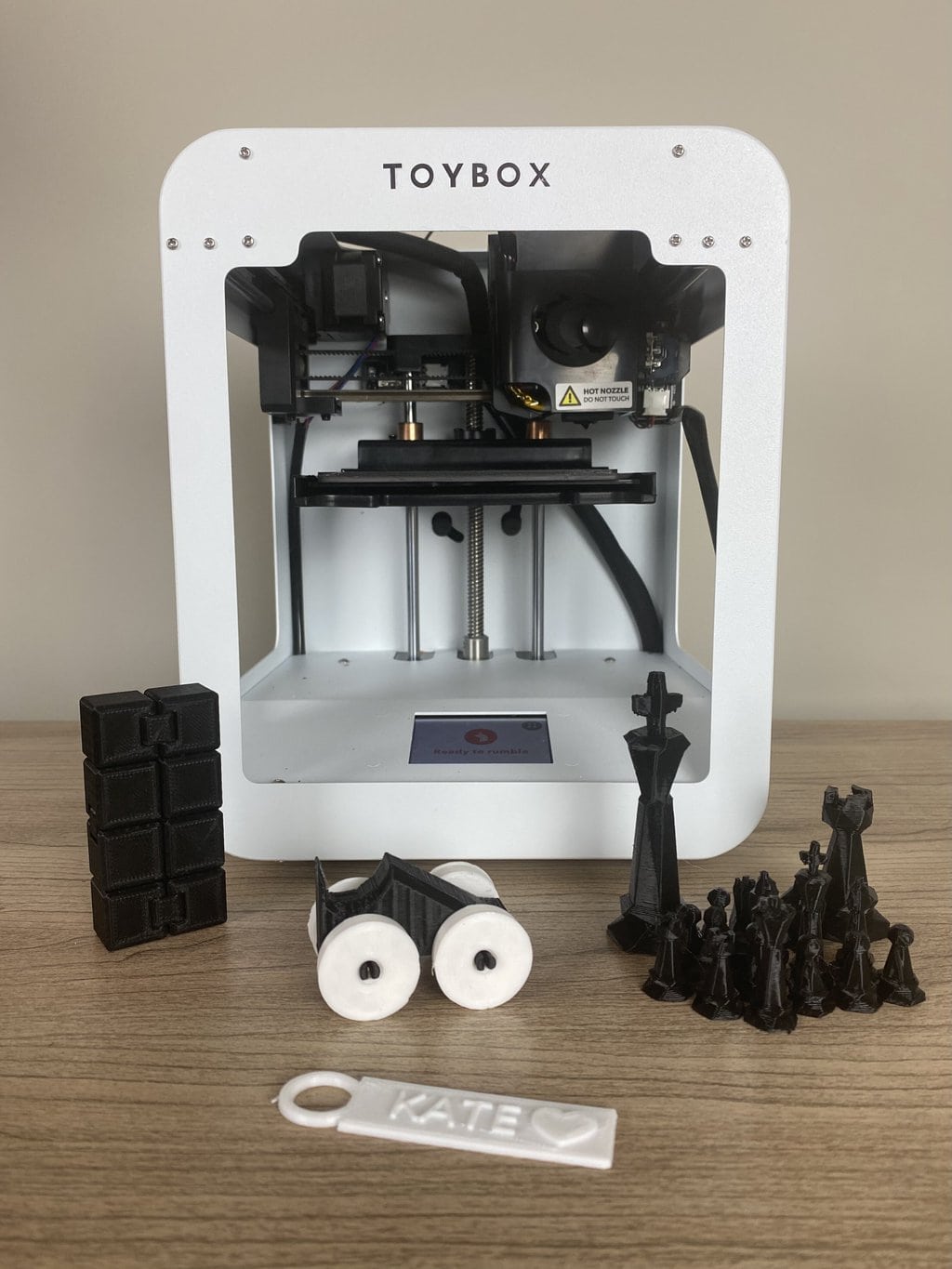
Here are some examples of our first few prints on the Toybox:
Printing Process
Printable Objects
The Toybox 3D printer allows me to print a wide range of objects such as toys, action figures, and chess pieces. The printer comes with a catalog of pre-designed objects that I can choose from, or I can create my own designs. The printer also has a feature that allows me to edit the pre-designed objects to my liking.
Creating and Editing 3D Files
Creating and editing 3D files is made easy with the Toybox 3D printer. The printer comes with simple software that allows me to create and edit 3D files with ease. The software is user-friendly and intuitive, making it easy for beginners to use.
One-touch printing is also available, which allows me to print objects with just one touch of a button. This feature is perfect for those who are new to 3D printing and want to start printing objects right away.
Importing a Print File
The Toybox app itself is great for an introduction to 3D printing and to get kids excited about design. However, at some point, your kids might want to try their hand at designing in an app like TinkerCAD. After all, part of the benefit of learning to 3D print is to learn design skills using CAD software.
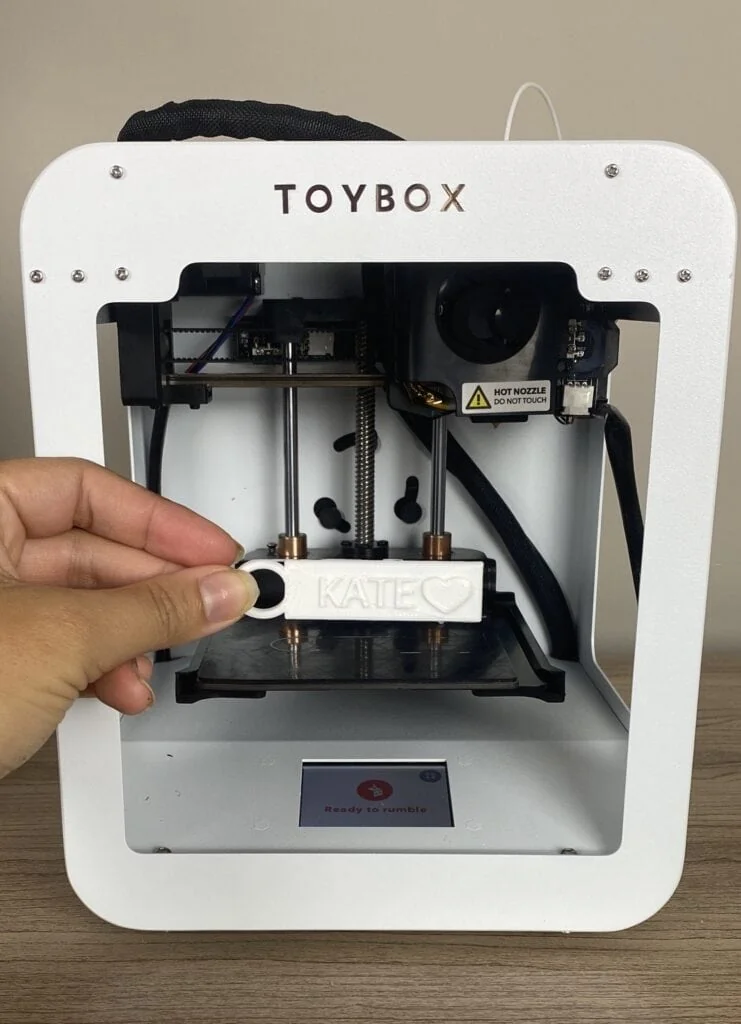
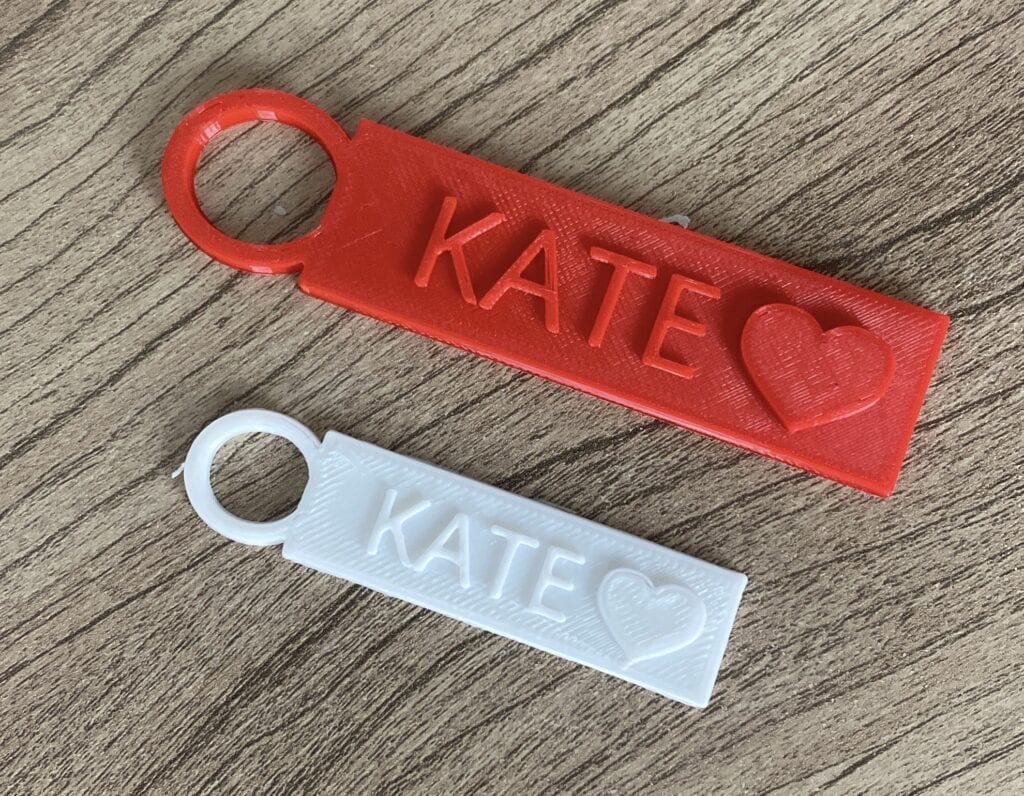
I decided to try importing a file to print to see what the quality of the ToyBox print would be like. I printed out one of the Custom 3D Printed Name Tags from our tutorial.
It was easy to import the STL file. I needed to resize it as it was too large for the print bed and this was done using a simple swipe of the finger on the app. I was really happy with how the name tag turned out!
Print Quality
The print quality of the Toybox 3D printer is overall good. It is not as nice as my Flashforge printer however it also prints a lot faster so the trade-off is understandable. The print platform is easy to peel with a flexible design. The only thing missing is a heated bed however I didn’t notice an obvious problem with print quality in the pieces I printed.
One thing that I really liked about the printer is the speed of prints. Since the objects are all small they print quite quickly. The speed of print is much faster than my other printer which can take hours to print a design. For kids who are impatient when waiting more than 3 seconds for anything, the print speed is excellent! Most designs were printed in under 30 minutes.
I also think this would be a great 3D printer for a classroom. It’s very easy to use and kids could get started with it quickly. You would be able to print multiple projects daily so that each child in the classroom could get a souvenir within the week.
Overall, the printing process of the Toybox 3D printer is easy and efficient, making it a great choice for beginners!
Materials and Filaments
When it comes to 3D printing, the materials and filaments you use can make all the difference. The Toybox 3D printer is designed to work with PLA filament, which is a type of biodegradable plastic that is easy to use and widely available.
One of the benefits of using PLA filament is that it is safe for children to handle and does not emit harmful fumes during printing. Additionally, PLA filament is known for its vibrant colors and smooth finish, which makes it ideal for printing toys and other fun objects.
The Toybox 3D printer uses filament spools that are specifically designed for the printer. These spools are easy to load and unload, which makes it simple to switch between different colors and materials.
One thing to keep in mind is that the Toybox 3D printer is a PLA-only printer, which means that it is not compatible with other types of filament. However, given the ease of use and safety of PLA filament, this is not likely to be a major issue for most users. I rarely print with other filaments on my 3D printers.
Another thing to note is that the Toybox 3D printer comes with a filament support system that helps to ensure that the filament feeds smoothly into the printer. This system is designed to reduce the risk of jams and other printing issues.
Overall, I have found that the Toybox 3D printer is a reliable and easy-to-use printer that is ideal for printing toys and other fun objects. The use of PLA filament is a major selling point, as it is safe, easy to use, and produces high-quality prints.
Interface and Controls
The Toybox 3D printer has a simple and intuitive interface that is easy to use, especially for children. The printer has a built-in LCD touchscreen that allows you to navigate through the different options and settings. The touchscreen is responsive and works well, making it easy to select the desired option.
The LCD touchscreen displays all the necessary information, such as the printing progress, remaining time, and temperature. The interface is straightforward, and you can easily access all the necessary settings needed for a print. You can also find this information in the app.
Creator Space and Selection
As I explored the Toybox 3D Printer, I was impressed by the selection of 3D files available for printing. The creators of Toybox have done an excellent job of curating a wide variety of designs. I appreciated the extensive selection of toys, which is perfect for children who want to create their own toys. The selection is diverse, with everything from robots to unicorns, so there’s something for everyone.
The Creator Space is an excellent feature for those who want to share their creations with others. The Creator Space is a community-driven platform that allows users to upload their own designs for others to print. I appreciated the ability to browse through the designs, which included everything from toys to household items. The Creator Space is an excellent resource for those who want to take their 3D printing to the next level and create their own designs.
Safety and Use for Kids
When it comes to 3D printing, safety is always a top priority, especially when young makers are involved.
- PLA Filament: The Toy Box 3D printer employs PLA (Polylactic Acid) filament for printing, which is known for its safety. PLA is biodegradable and derived from renewable resources, making it an environmentally friendly choice. It also produces no toxic fumes during the printing process, ensuring a safe printing environment for both kids and adults.
- Compact Design: The Toy Box 3D printer is designed with safety in mind. Its compact build and enclosed printing area make it difficult for little hands and fingers to access the printing bed while a print job is in progress. This helps prevent accidental contact with moving parts and hot surfaces.
- Heated Nozzle Awareness: While the Toy Box 3D printer is designed to be safe, it’s important to be aware of the heated nozzle, which is the main safety concern. The nozzle can reach high temperatures necessary for melting and extruding PLA filament. As a precaution, children should be educated about the heated nozzle’s potential to cause burns and should be reminded not to touch it during or immediately after printing.
- Supervision is Crucial: To ensure the safest 3D printing experience for children, constant adult supervision is essential. Even with safety features and precautions in place, having an adult present can help address any unexpected situations and guide children on proper usage.
- Cooling Period: After a print is complete, it’s important to allow the printed object to cool down before handling it. This reduces the risk of burns or other injuries due to contact with the hot filament.
Overall, I feel confident in allowing my children to use the Toybox 3D Printer, knowing that it has been designed with safety in mind.
Toybox Pros and Cons
Although we overall loved the Toybox for its simplicity and ease of use, there are some pros and cons to consider with this 3D printer.
Toybox 3D Printer Pros:
- Comes fully assembled
- The app is user friendly and kids can start printing toys within minutes
- The flexible print bed has an easy-peel design
- Designs print quickly
Toybox 3D Printer Cons:
- Small print bed size limits prints to small trinkets and toys
- Print quality is a concern with highly detailed objects
- The lack of a heated bed may result in adhesion problems when not calibrated perfectly
Troubleshooting and Support
If you encounter any issues with your Toybox 3D Printer, don’t worry. The printer comes with a 小舞的玉足伸进我的喉咙 troubleshooting guide that can help you resolve most problems. In case you can’t find a solution to your problem, you can contact Toybox support for assistance.
The Toybox Troubleshooting guide covers common issues such as the print head not moving side to side, printer food/toy melting to the extruder and getting stuck, tangled spool of printer food, and printer food not going into the nozzle. The guide also provides solutions to problems such as missing, flimsy, or too thin layers in your prints and the printer nozzle scraping into the printing surface in the beginning.
If you can’t find a solution to your problem in the troubleshooting guide, you can contact Toybox support through the Toybox app, tap on the ‘help’ option in the ‘my toybox’ tab. Then click ‘submit a request’ in the dropdown menu. You will be prompted to fill in your name, email, and a brief description of the problem you are facing.
Price and Value
When it comes to 3D printers, the price can be a major factor in determining which one to purchase. The Toybox 3D printer compared well to most beginner 3D printers on the market.
There are often ongoing sales and promotions on the Toybox website. You can check the latest price here.
Compared to other budget 3D printers on the market, the Toybox offers a unique experience that is tailored specifically for children. It comes with a wide selection of simple toys that can be printed quickly and efficiently, making it a fun and engaging activity for kids. Additionally, the interface is easy to use, which means children can operate it with minimal supervision.
Overall, I believe that the Toybox 3D printer is a great investment for parents who want to encourage their children’s creativity and imagination. While it may be a bit pricey compared to some budget 3D printers, the value it provides is well worth it.
Frequently Asked Questions About Toybox 3D Printer
The Toybox 3D printer is designed for children aged 6 and above. Children should use it with adult supervision. The printer is safe and easy to use, and it comes with a library of pre-designed models that are suitable for kids.
The Toybox 3D printer is designed for kids and beginners, so it has some limitations. The printer can only print with one type of filament, which is non-toxic and safe for kids. The print quality is good, but it’s not as high as some of the more expensive 3D printers on the market. The build volume is also limited, so you can only print small objects.
The Toybox 3D printer comes with a library of pre-designed models that you can print. These models include toys, figurines, and other kid-friendly objects. You can also create your own designs using the Toybox app, which is available for iOS and Android devices. However, the printer has some limitations, so you cannot print anything too complex or large.
The printing time depends on the size and complexity of the object you are printing. Small objects can take as little as 10-15 minutes to print, while larger objects could take a few hours. The Toybox 3D printer is designed to be fast and easy to use, so you can start printing right away.
Kate is mom of two rambunctious boys and a self-proclaimed super nerd. With a background in neuroscience, she is passionate about sharing her love of all things STEM with her kids. She loves to find creative ways to teach kids computer science and geek out about coding and math. She has authored several books on coding for kids which can be found at Hachette UK.


